

A WMS integration checklist is a short list of questions about data direction, timing, ownership, and access that you answer before wiring any warehouse system to your ERP, storefront, or client systems, and Shipider is built so most of those answers are straightforward: real-time webhooks, an API-first design, scoped keys, and a full audit trail on every synced record. This article is not the general vendor evaluation checklist. It is aimed at whoever on your team actually has to make the connection work: the technical buyer, the ops manager who talks to a developer, or the founder who is doing both jobs at once.
Most WMS demos sell you on screens. Nobody shows you what happens when your storefront pushes an order at the same second a carrier webhook updates tracking, or when a SKU gets renamed in your ERP but not in the warehouse. Those are the moments that decide whether an integration is a five-minute setup or a recurring support ticket. The questions below are meant to surface that before you sign anything, not after.
What a WMS integration checklist actually covers
An integration checklist is different from a features checklist. Features tell you what a system can do in isolation. Integration questions tell you what happens at the seams, where your WMS meets your ERP, your storefront, your carrier, or a client's own systems if you run a 3PL. Seams are where double entry creeps back in, where inventory counts drift apart, and where nobody can say which system is the source of truth.
The goal is not to eliminate every seam. It is to know exactly where they are, who owns each one, and what evidence exists when something goes wrong. That last part matters more than most teams expect: an integration without a record of what was sent, received, and changed is an integration you cannot debug six months from now.
Questions to ask before you connect anything
What data needs to move, and in which direction
Start by listing the actual data types, not the systems. Orders in, tracking numbers out, inventory levels both ways, SKU and product data usually one way from your source of truth. Vague answers like "everything should sync" are how integrations balloon into unplanned projects. Shipider exposes orders, inventory levels, pallet and location data, and status changes through its API and webhooks, documented at /api-docs, so you can decide field by field what actually needs to cross the wire.
Real-time or batch, and does it matter here
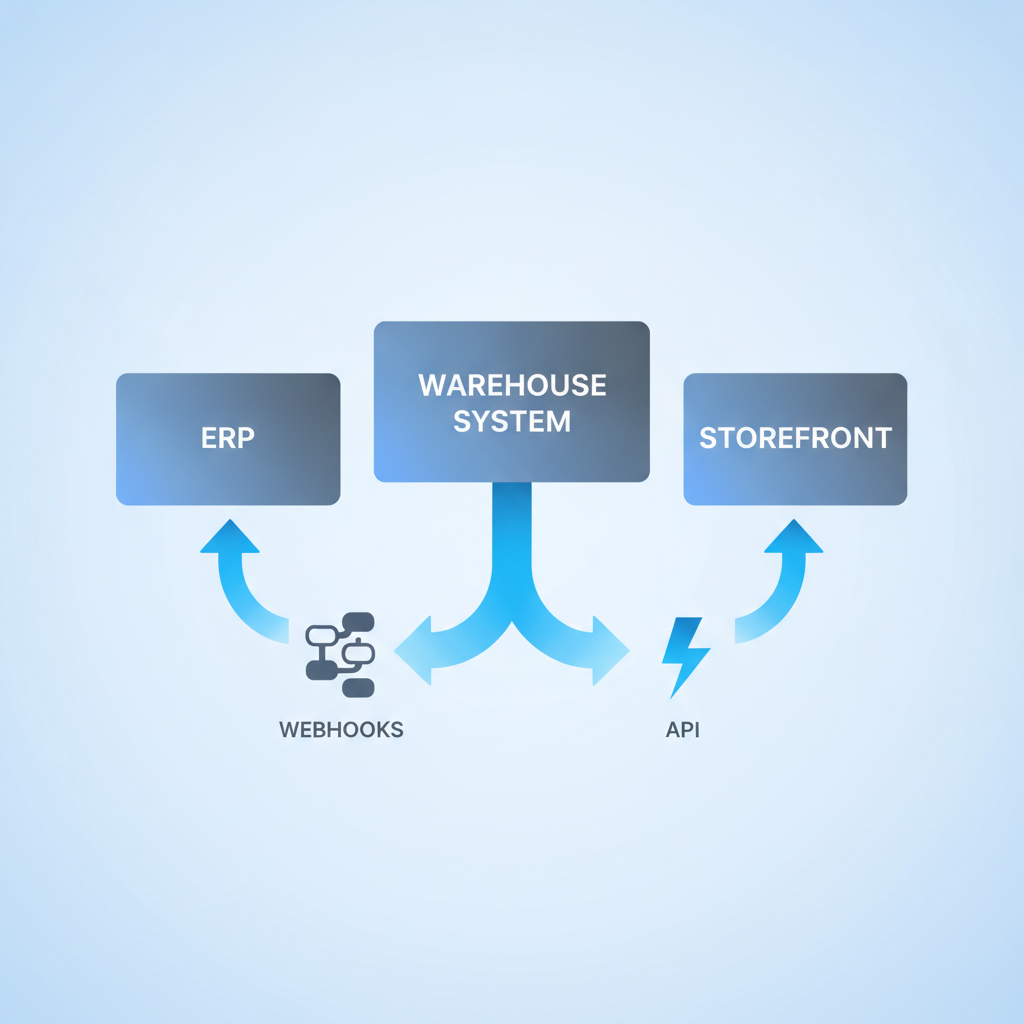
Not everything needs to be instant. Inventory counts for a fast-moving DTC brand probably do. A nightly product catalog sync usually does not. Ask your vendor whether updates fire as webhooks the moment something changes in the warehouse, or whether you are stuck polling an endpoint on a schedule. Polling adds delay and load on both sides; webhooks push the update when it happens. If you want the mechanics, the piece on wiring your warehouse into your stack with webhooks and the API walks through both patterns.
Who owns the mapping when SKUs or locations don't match
Almost no two systems use identical identifiers out of the box. Your ERP might use an internal part number, your storefront a variant ID, and your warehouse a SKU with a suffix for lot or batch. Someone has to own the mapping table, and someone has to own what happens when a new SKU shows up that isn't mapped yet. Ask specifically: does the WMS reject unmapped SKUs, hold them in a queue, or silently create a placeholder? Silent placeholders are how discrepancies start.
What happens when the connection fails
Networks drop, APIs time out, a vendor pushes a deploy at the wrong moment. The real question is not whether failures happen but what the system does about it. Does it retry automatically? Does it log the failed attempt somewhere you can see? Does an order silently vanish, or does it sit in a visible error state until someone resolves it? A WMS with a real audit trail, like Shipider's, records the attempt and the outcome, so a failed sync is a visible event, not a mystery gap in inventory three weeks later.
How is access scoped and secured
If you're connecting a 3PL's multiple client systems, or even just your own ERP and storefront, a single all-access API key for everything is a liability. Ask whether the WMS supports scoped keys that limit what each integration can read or write. Shipider issues scoped API keys per integration, which means a broken storefront connector can't accidentally touch pallet records it has no business seeing. There's more detail on this in the piece on scoped API keys for warehouse integrations.
Integration methods, compared
Different integration methods fit different volumes and levels of technical comfort. The table below is a fast reference for matching a method to your situation before you commit engineering time.
| Method | Best for | Latency | Setup effort |
|---|---|---|---|
| Webhooks (push) | Order status, inventory changes, dispatch events | Near real-time | Moderate: requires an endpoint to receive events |
| API polling | Systems that can't receive inbound calls | Delayed by poll interval | Low to moderate |
| CSV or Excel import | Initial setup, catalog updates, one-off bulk changes | Manual, on demand | Very low, no developer needed |
| Native connector | Common platforms with a pre-built integration | Depends on connector | Low if one exists for your stack |
Most warehouses end up using more than one method at once: an Excel import to get started fast (covered in setting up a warehouse in minutes with Excel import), webhooks for ongoing order and inventory flow, and the API for anything custom your ERP needs. There's nothing wrong with a mixed approach as long as each seam is documented.
A practical checklist you can walk into a vendor call with
Bring this list to any WMS demo or technical call. If a vendor can't answer these clearly, that's information too.
- What specific data fields does the API expose, and is there public documentation I can read before I buy?
- Do webhooks exist for order creation, inventory change, and dispatch, or only for a subset?
- Can I scope an API key to read-only, or to a single integration, so a bug in one connector can't touch everything else?
- What does the system do when a sync fails: retry, queue, or drop?
- Is there an audit trail showing what was synced, when, and by which integration, not just by which user?
- If I run multiple client accounts or brands, is data isolated per tenant at the API level, or just in the UI?
- What's the realistic timeline to get orders flowing from my storefront or ERP into the WMS: days, or months?
That last question matters more than it looks. A lot of WMS platforms are built for enterprise rollouts where a six-month integration timeline is normal. If your team doesn't have six months, ask for a straight answer up front rather than discovering it during implementation.
How Shipider handles this technical layer
Shipider was built API-first, which means the same endpoints and webhooks that power the app itself are the ones exposed for integrations, documented at /api-docs. Orders, inventory, pallet and location data, and status changes are all available without needing a dedicated hardware layer or a separate integration product. Every synced change lands in the same audit trail as manual actions in the warehouse, so when something looks off, you can trace it back to whether a human or an integration made the change, and when.
For 3PLs running multiple client systems, the multi-tenant structure means each client's data and each integration's access can be isolated rather than lumped into one shared pool. Combined with scoped API keys, that keeps one client's broken connector from ever touching another client's records. And because pricing is token-based rather than per-seat, adding an integration or a new site doesn't require renegotiating your contract; details are on /pricing.
If you're comparing this against building a custom sync to an ERP, the piece on ERP sync without double entry goes deeper into that specific case. And if integrations are one piece of a broader vendor evaluation, the WMS buying checklist covers the rest of what to ask beyond the technical layer.
Frequently asked questions
What is a WMS integration checklist?
It's a set of questions about data direction, sync timing, error handling, and access control that you answer before connecting a warehouse management system to your ERP, storefront, or other software, so the integration doesn't create double entry or hidden failure points later.
Do I need a developer to integrate a WMS with my ERP?
For a basic setup using Excel import or a native connector, often no. For custom webhook handling or deeper API work with your ERP, you'll typically want at least someone comfortable reading API documentation, even if it's a part-time resource rather than a full engineering team.
What's the difference between webhooks and API polling?
Webhooks push data to you the moment an event happens, like an order status changing, giving near real-time updates. API polling means your system checks the WMS on a schedule and only sees changes at the next poll, which introduces delay proportional to how often you poll.
How does Shipider secure integrations for multiple clients or brands?
Shipider uses scoped API keys that limit what each integration can read or write, combined with multi-tenant isolation so data for one client or brand doesn't mix with another's, even when multiple integrations are running at once.
What happens if a webhook or API call fails?
A well-built WMS should log the failed attempt and make it visible rather than silently dropping the event. Shipider records sync activity in the same audit trail used for manual warehouse actions, so failures are traceable instead of showing up later as unexplained inventory discrepancies.
If you're ready to see how the API, webhooks, and scoped keys actually work on real orders and inventory, create a free Shipider account and connect your first integration without waiting on a sales cycle.